Call us now :07971189175
 Send Inquiry
 Send Inquiry
Finite Element Analysis Software
MOQ : 1 , , Piece
Finite Element Analysis Software Specification
- Customization
- Scripting and API Access
- Input File Types
- .step, .iges, .stl, .igs
- Mesh Types Supported
- Tetrahedral, Hexahedral, Shell, Beam
- Application
- Engineering Simulation
- Supported Operating System
- Windows
- Support
- Email and Phone
- Product Type
- Analysis Software
- License Type
- Commercial
- Output Formats
- .cae, .inp, .dat, .odb
- Usage
- Structural, Thermal, and Fluid Simulations
- System Requirements
- Minimum 4GB RAM, 2GHz Processor, 1GB GPU
- Software Name
- Finite Element Analysis Software
- Integration
- CAD Import Supported
- Documentation
- User Manual, Online Help
- Update Frequency
- Semi-Annual
- Language
- English
- User Interface
- Graphical (GUI) & Command Line
- Version
- Latest
Finite Element Analysis Software Trade Information
- Minimum Order Quantity
- 1 , , Piece
- Supply Ability
- 4 Pieces Per Day
- Delivery Time
- Week
Finite Element Analysis Software About
With an aim to cater to the diverse software needs of our valuable patrons, we are engrossed in offering superior quality Finite Element Analysis Software. Provided software is commonly used software for the analysis of FEM. It is also used for research applications and academic teaching that includes entry-level tools for providing instruction and class demonstration. Offered software is developed after immense research and development to make it perfect in every aspect. Moreover, this Finite Element Analysis Software can be availed by our customers at the most affordable prices.
Features:
-
Wide usage
-
User friendly interface
-
Simple to install
-
Free from run time error
Advanced Simulation Capabilities
With support for structural, thermal, and fluid scenarios, this software empowers engineers to conduct rigorous analyses using precise mesh types such as tetrahedral, hexahedral, shell, and beam elements. Results can be exported in multiple formats, ensuring seamless data exchange and reporting.
Intuitive User Experience
Finite Element Analysis Software offers both graphical and command-line interfaces, catering to novice and advanced users. Integration with common CAD formats and customizable workflows through scripting or API access accelerate design iterations and engineering processes.
Comprehensive Support and Reliable Updates
Users can access support by email or phone, while in-depth user manuals and online help facilitate troubleshooting and onboarding. The semi-annual update cycle ensures that the software remains current, functional, and secure for all commercial users.
FAQs of Finite Element Analysis Software:
Q: How do I import geometry from CAD into the Finite Element Analysis Software?
A: You can easily import your CAD designs using supported input file formats such as .step, .iges, .stl, or .igs. The softwares graphical interface provides a clear pathway for importing these files, enabling seamless integration with your existing CAD workflow.Q: What are the minimum system requirements to run Finite Element Analysis Software?
A: To operate this software efficiently, your system should have at least 4GB RAM, a 2GHz processor, and a 1GB GPU. The software runs exclusively on Windows operating systems and is best suited for modern engineering workstations.Q: When are updates released for the Finite Element Analysis Software?
A: Updates are provided semi-annually to ensure users benefit from enhanced features, bug fixes, and security improvements. You will receive notification of new releases through official communication channels.Q: Where can I get user support if I encounter issues?
A: Dedicated support is available via email and phone. Comprehensive documentation, including a user manual and online help resources, further assists with troubleshooting and efficient software usage.Q: What process should I follow to customize simulations for specific engineering requirements?
A: Customization is supported through inbuilt scripting and API access. You can tailor simulation workflows, automate repetitive tasks, and extend software capabilities according to your unique engineering challenges.Q: Which output formats can I use for simulation results in Finite Element Analysis Software?
A: Simulation data can be exported in .cae, .inp, .dat, and .odb formats, giving you flexibility for post-processing, sharing, and integrating with other engineering analysis tools.Q: What are the benefits of using Finite Element Analysis Software for structural, thermal, and fluid simulations?
A: The software provides precise modeling with a choice of mesh types and robust simulation algorithms. Combined with regular updates, CAD integration, and easy customization, it enables faster and more accurate engineering decisions, improving productivity across distribution and supply chains in India.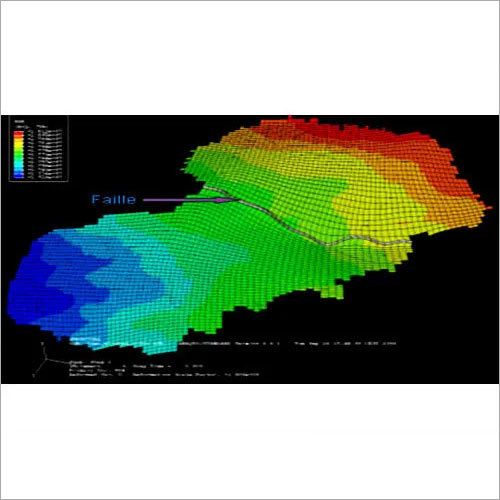



Tell us about your requirement

Price:
Quantity
Select Unit
- 50
- 100
- 200
- 250
- 500
- 1000+
Additional detail
Mobile number
Email

More Products in Civil Engineering Software Category

CSI Bridge Design Software
Price Range 50000.00 - 500000.00 INR / Piece
Minimum Order Quantity : 1 Piece
Integrated Building Design Software
Price Range 50000.00 - 500000.00 INR / Piece
Minimum Order Quantity : 1 , , Piece

Highways Design Software
Price Range 50000.00 - 500000.00 INR / Piece
Minimum Order Quantity : 1 , , Piece

We are providing our products across India.
 Send Inquiry

Our Products

B-302, Taj Enclave, Geeta Colony,Delhi - 110031, India

 Send Inquiry
 Send SMS
Developed and Managed by Infocom Network Private Limited.
