Call us now :07971189175
 Send Inquiry
 Send Inquiry
Plaxis 3D Software
MOQ : 1 Unit
Plaxis 3D Software Specification
- RAM Requirement
- 8 GB minimum, 16 GB or higher recommended
- File Import/Export Formats
- DXF, STL, PLAXIS native, others
- Languages Supported
- English
- Analysis Types
- Linear, nonlinear, consolidation, dynamic
- Supported Platforms
- Windows 10/11 (64-bit)
- Key Features
- 3D soil modeling, advanced soil constitutive models, tunnel & excavation simulation, pile and foundation analysis, staged construction analysis, groundwater flow coupling
- User Interface
- Graphical 3D user interface with visualization tools
- Graphics Requirement
- Dedicated graphics card with OpenGL support
- Processor Requirement
- Multi-core processor, 2.0 GHz or higher recommended
- Software Type
- Finite Element Analysis (FEA) for Geotechnical Engineering
- License Type
- Single-user, Network, or Academic
Plaxis 3D Software Trade Information
- Minimum Order Quantity
- 1 Unit
- Supply Ability
- 10 Units Per Week
- Delivery Time
- 4-12 Week
Plaxis 3D Software About
Being a quality oriented organization in the domain, we are affianced in offering top grade Plaxis 3D Software. This software is ideal for measuring non-linear, stress & time-dependent behavior of soil as well as rock masses. The provided software is developed and designed under the stern direction of dexterous developers. In addition, the offered Plaxis 3D Software can be purchased from us at cost effective prices within committed time frame.
Key Points:
- Simple to use and understand
- Easy to install
- Highly secure
- Compatible with different operating systems
Advanced Geotechnical Modeling
Plaxis 3D empowers engineers to construct intricate 3D models of soil and structures, enabling advanced simulation of real-world conditions such as tunnel excavation, pile design, and foundation behavior. Its graphical interface and versatile visualization tools facilitate problem setup and results interpretation, improving design accuracy and project outcomes.
Versatile Analysis Capabilities
The software offers a suite of analysis typeslinear, nonlinear, consolidation, and dynamicaddressing a wide spectrum of geotechnical challenges. This adaptability allows users to assess soil behavior, predict ground movement, and evaluate the impact of construction sequences under various loading scenarios.
Seamless Data Exchange
Supporting multiple file formats (DXF, STL, PLAXIS native, and more), Plaxis 3D streamlines the process of exchanging project data between different CAD and analytical platforms. This compatibility ensures efficient workflow integration for both small and large geotechnical teams.
FAQs of Plaxis 3D Software:
Q: How can I install Plaxis 3D Software on my system?
A: To install Plaxis 3D, ensure your computer runs Windows 10 or 11 (64-bit) with a multi-core processor (2.0 GHz or higher recommended), at least 8 GB RAM (16 GB recommended), and a dedicated graphics card with OpenGL support. Obtain the installation package from an official distributor, service provider, or supplier in India, then follow the step-by-step installation guide provided by Plaxis.Q: What geotechnical engineering problems can Plaxis 3D help solve?
A: Plaxis 3D addresses a broad range of geotechnical challenges, such as 3D soil modeling, tunnel and excavation simulation, pile and foundation analysis, and staged construction. It also offers advanced soil constitutive models and dynamic analysis, making it ideal for complex engineering projects involving soil-structure interaction.Q: When should I use the groundwater flow coupling feature in Plaxis 3D?
A: Enable groundwater flow coupling when your project involves interactions between soil deformation and groundwater movement, such as in excavations below the water table, design of retaining structures, or assessing stability during construction. This feature enhances the accuracy of your analysis in water-sensitive environments.Q: Where can I purchase or obtain support for Plaxis 3D Software in India?
A: Plaxis 3D is available through authorized distributors, service providers, suppliers, and traders across India. Many offer technical support, training, and licensing options (single-user, network, and academic), ensuring smooth onboarding and ongoing assistance for users.Q: What is the process for importing existing CAD models into Plaxis 3D?
A: You can import models in DXF, STL, and other compatible formats directly into Plaxis 3D. Use the import function within the graphical interface to integrate your existing geotechnical or structural designs, streamlining workflow and reducing model setup time.Q: How does Plaxis 3D benefit geotechnical professionals?
A: Plaxis 3D improves project reliability and efficiency by offering advanced modeling capabilities, sophisticated soil analysis tools, and comprehensive result visualization. Its integration-friendly file support and responsive user interface help teams make well-informed decisions on complex geotechnical engineering projects.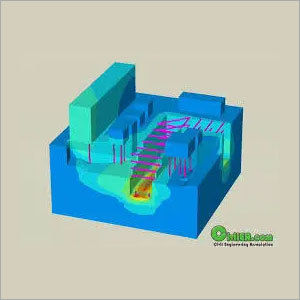
Tell us about your requirement

Price:
Quantity
Select Unit
- 50
- 100
- 200
- 250
- 500
- 1000+
Additional detail
Mobile number
Email


We are providing our products across India.
 Send Inquiry

Our Products

B-302, Taj Enclave, Geeta Colony,Delhi - 110031, India

 Send Inquiry
 Send SMS
Developed and Managed by Infocom Network Private Limited.
