Call us now :07971189175
 Send Inquiry
 Send Inquiry
Scientific Graphing Software
MOQ : 1 Unit
Scientific Graphing Software Specification
- Integration
- Compatible with MS Excel, CSV, TXT data
- System Compatibility
- Windows 7/8/10/11
- Minimum RAM Required
- 2 GB
- Graph Types
- Line, Bar, Pie, Scatter, 3D Surface
- Export Capability
- Yes
- Version
- Latest
- Output Formats Supported
- JPEG, PNG, TIFF, PDF, EPS
- Minimum Hard Disk Space
- 500 MB
- Minimum Processor Required
- 1 GHz or Faster
- Type
- Scientific Graphing Software
- Operating System
- Windows
- User Interface
- Graphical
- Support
- Online Assistance
- Customization
- Graph Templates, Color Schemes, Fonts
- Update Frequency
- Regular Online Updates
- License Type
- Single User / Multi User
- Data Import Options
- Direct from Spreadsheet, Text Files
- Usage/Application
- Data Analysis and Presentation
Scientific Graphing Software Trade Information
- Minimum Order Quantity
- 1 Unit
- Supply Ability
- 10 Units Per Week
- Delivery Time
- 4-12 Week
Scientific Graphing Software About
This highly efficient Scientific Graphing Software promotes quick analysis of graph based data, processing of images and programming of software tools for engineering professionals. It supports Windows and Macintosh interfaces and it enables user to generate three dimensional engineering models. Apart from its advanced image analysis tools, this graphing software offers signal processing facility. One can generate scientific graphics for journal with the help of this software. Peak fitting and curve fitting analytical methodologies can be executed via this software. The displayed image can be configured as per application needs. Pre programmed parameters of this software can be modified. It also offers advanced supporting facility for uniformly spaced data. We are a prestigious trader and supplier of Scientific Graphing Software.
Powerful Visualizations for Scientific Data
Create detailed and publication-ready graphs easily using the user-friendly interface. Whether you need 2D or 3D graphs for your studies or presentations, this software supports a range of types to showcase results clearly. Graph customization options allow personalization for any research requirement.
Seamless Data Integration and Export
The software integrates effortlessly with MS Excel, CSV, and TXT data sources. Users can import information directly and export finished graphs in multiple formats, facilitating smooth workflow between analysis and presentation. Share findings easily by saving graphs as JPEG, PNG, TIFF, PDF, or EPS files.
Reliable Support and Regular Updates
Benefit from ongoing online assistance and frequent updates, ensuring optimal performance and feature availability. The software is distributed, supplied, and supported across India, making it a dependable solution for scientific graphing needs on Windows platforms.
FAQs of Scientific Graphing Software:
Q: How can I import data into the scientific graphing software from MS Excel or CSV files?
A: You can import data by selecting the direct import option in the softwares interface. It supports importing data from MS Excel spreadsheets, CSV files, and TXT files, enabling quick integration of your datasets for graph creation.Q: What types of graphs can be generated using this software?
A: The software allows you to create various graph types, including line, bar, pie, scatter, and 3D surface graphs. These options are accessible through the graphical user interface, making it simple to visualize complex data sets.Q: When are regular online updates provided for the software?
A: Regular online updates are issued periodically to ensure users have access to the latest features and improvements. These updates can be downloaded directly from within the software whenever new versions are available.Q: Where is this scientific graphing software supported and distributed?
A: The software is distributed, supported, and serviced throughout India by authorized distributors, service providers, suppliers, and traders. Online assistance is available to help users with installation, operation, and troubleshooting.Q: What is the process for exporting graphs created in the software?
A: After designing your graph, you can use the export feature to save it in various formats, including JPEG, PNG, TIFF, PDF, and EPS. This process is streamlined within the interface, making sharing and publication straightforward.Q: How can I customize the appearance of my graphs?
A: Customization options are available for graph templates, color schemes, and fonts. You can adjust these elements in the graph properties section to better match your presentation style or research requirements.Q: What are the benefits of using this product for scientific data analysis and presentation?
A: The software simplifies complex data analysis and visualization, offers flexible customization, ensures compatibility with common data sources, and supports secure export. Regular updates and dedicated online support further enhance user experience and reliability.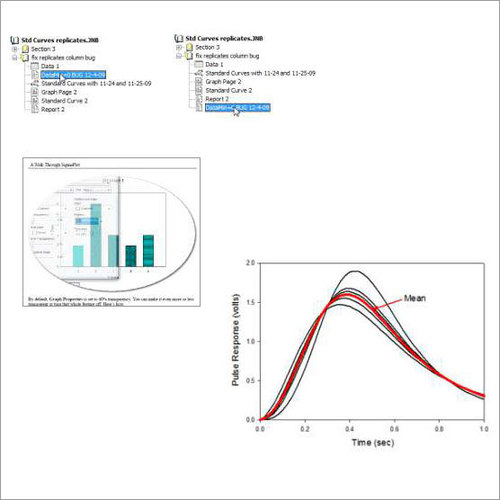
Tell us about your requirement

Price:
Quantity
Select Unit
- 50
- 100
- 200
- 250
- 500
- 1000+
Additional detail
Mobile number
Email


We are providing our products across India.
 Send Inquiry

Our Products

B-302, Taj Enclave, Geeta Colony,Delhi - 110031, India

 Send Inquiry
 Send SMS
Developed and Managed by Infocom Network Private Limited.
